
Summary:
This bot will login to CashPro and download the different Treasury Reports to DropBox daily at 7:30AM.
Process Owners: Katelyn Clapp
Bot Owner(s): Dan Hogfelt
Developers: ReTransform
Relevant Systems:
- Alteryx
- CashPro
- Box
Business Continuity Plan:
If automation doesn't complete by 9am EST, Bot Owner to retry process one (1) time. If the process still fails to complete after another try then Process Owner(s) to follow the below steps to generate the report manually while the issue is diagnosed and resolved.
- Navigate to Bank of America Cash Pro and log in: https://cashproonline.bankofamerica.com/cpoauthweb/cpo/#/login/public/signin
- If needed answer security questions.
- On the CashPro home page navigate to download reports section and download the MTD Daily Activity file.
- Log out of CashPro Page.
- Open Excel Application then change the MTD Daily Activity file extension from .xls to .xlsx and save the file.
- Open Alteryx Application.
- Open Daily Cash Position vMH workflow file.
- Run Daily Cash Position vMH workflow.
- Close Alteryx application.
- Upload files to Drop Box folder https://avisonyoung.app.box.com/folder/156052903010
Runbook:
The runbook should provide information to support the bot in the case that any issue occurs.
Password Incorrect/Expiration: If the password is incorrect, password will need to be reset by following the below :
1. Go to CashPro
2. Attempt to login with CashPro credentials. This will determine if the password is incorrect (has been modified and not reflected with bot). Or if the issue is something else, such as bot incorrectly keying in the password, or selecting an incorrect field.
Note: If the password is incorrect upon attempting a manual login, continue to step 3. Else, determine if the root through further investigation.
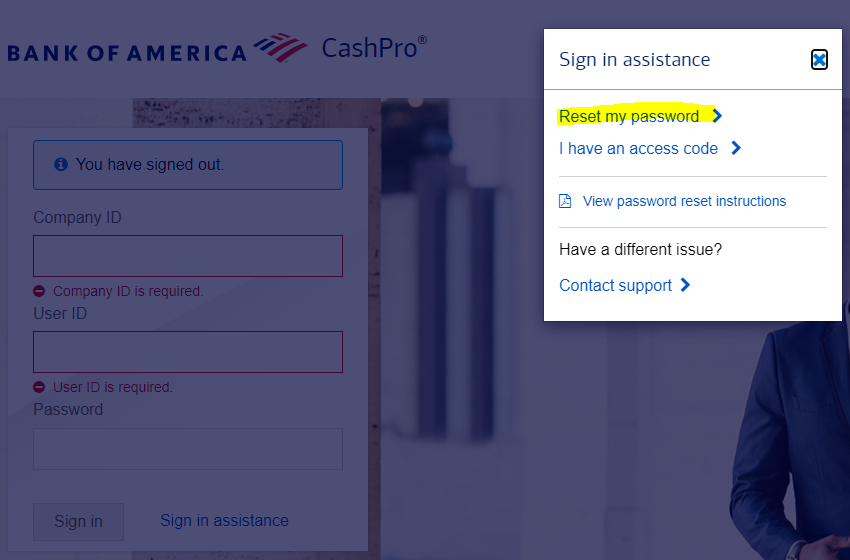
3. Rest Password
*Company ID = Avisonyo
*User ID = rpatreasury
-A reset will be sent to the email address on the account. rpa.treasury@avisonyoung.com
4. Update the Assets in the Orchestrator to reflect the new password.
5. ReTrigger the bot so the files can be downloaded for the day to fulfill use-case.
Alteryx License Expiration Issues:
If license is expired, contact Paul Shuler to renew license.
Alteryx License Activation Issues:
If license won't activate correctly, it may because the allocated license doesn't have "Server OS" enabled, which is required to run the license on a virtual machine (bot machine). Contact fulfillment@alteryx.com with the license key and details to have Server OS Enabled. They may provide trial license with Server OS in the meantime.
Alteryx File Edits:
If Alteryx File needs to be edited, it can be opened by logging into the Virtual Machine
C:\Users\ayrobotuser\.nuget\packages\ay_finance_Download.Treasury.Report\"Package ID"\lib\net45\Data\Input\Alteryx_Workflow
Note: The correct version of Alteryx needs to be used to be compatible with the RPA Process. For this reason, please make the changes on the Bot Machine which is running Alteryx Version.
Note: If changes are made to the Alteryx Workflow, a new version of the Package has to be pushed to Production with the updated workflow. This is so the correct Alteryx file is kept. If you don't push a new package, the next time someone pushes a package, the outdated Alteryx File that was originally submitted in the package would be pushed instead.
Comments
0 comments
Please sign in to leave a comment.