
Summary:
The automation is tied to a trigger in Avant. The user clicks the Avant button and the automation will produce several slides based upon the number of Property ID's that are requested from the button in Avant. The automation utilizes several queries to acquire information of each property and place them within a PowerPoint file for the end-user
Process Owners: Carl Caputo
Bot Owner(s): Dan Hogfelt
Developers: Karina Hernandez, Jacob Pack
Relevant Systems:
- Avant
- PowerPoint
Business Continuity Plan: If Process fails, email to be sent to distribution list informing them that the process failed. A ticket should be created in Zoho Desk for the bot issue to be investigated, fixed, tested, and redeployed according to change management practices.
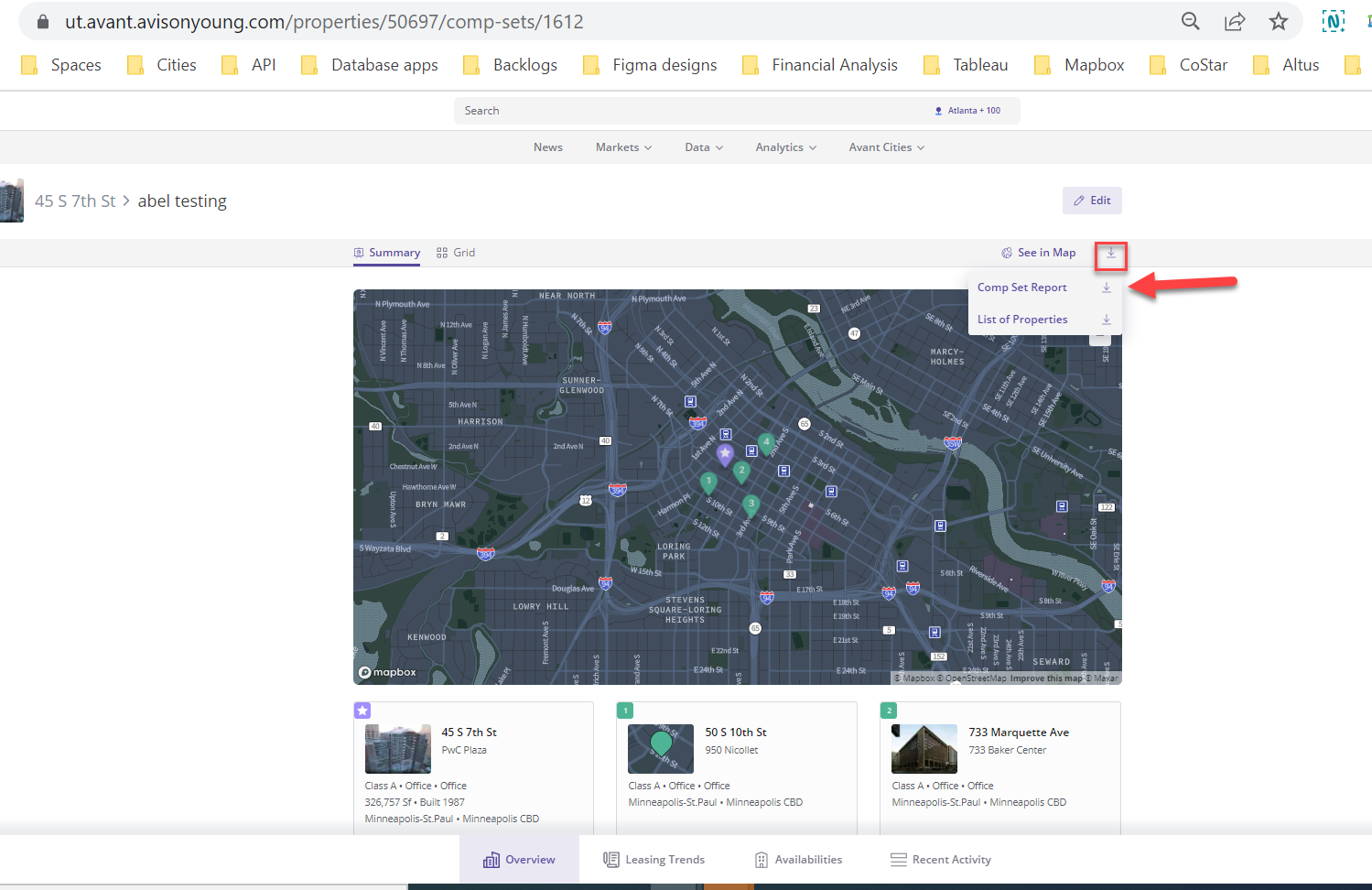
- Steps to navigate to the trigger:
- Navigate to and log in to Avant.
- Navigate to the properties you want to generate reports for
- Click on the download button.
- Click comp set report
- https://ut.avant.avisonyoung.com/properties/50697/comp-sets/1612 <-- Example
Expected Volume: This bot is executed by the end-user whenever required.
Credential Management:
SLA: The process takes approximately 3 minutes to complete.
Scheduling: No schedule, the process is ran on-demand by the end-user
Triggers: The process is triggered by the end-user clicking the export to PPT button on Avant.
Queues: The Generate Comp Set PPT queue is is populated each time a user in Avant triggers the button to export a PPT.
Assets: (Shared Folder)
- SMTP From Email
- SMTP Port
- SMTP Host
- SMTP Password
- buildingSize.graphql
- leaseDetails.graphql
- leaseExpirations.graphql
- properties.graphql
- propertyInfo.graphql
- recentSales.graphql
- salesDetails.graphql
- user_details.graphql
- assetPerformance.graphql
- availableSpace.graphql
Reporting:
Distribution List: - List of people that the emails should be sent to from UiPath.
- Whatever user requested the Comp set from Avant.
KPI's:
Runbook:
The runbook should provide information to support the bot in the case that any issue occurs.
If Bot Fails: An email will be sent saying the bot failed and what period failed to run. There are also messages being logged to the Orchestrator Tenant at the start and end of each major sequence to make it easy to see where the bot is failing.
DevOps Epic: https://dev.azure.com/AY-InnovationCenter/UiPath%20Automations/_workitems/edit/8203 Automation Hub Link:
Comments
0 comments
Please sign in to leave a comment.