
Summary:
This Automation project is to create Vendor Bills in NetSuite using aggregating data submitted by Coders(received in the form of Queue item ”Invoice Processing” in UiPath), as well as extracting information from PDF invoices(Document Understanding applied by UiPath). By having the collected data, bot (Invoice Processing Performer) was able to create (API requests) Vendor Bills. Throughout this automation project, there are certain stages where Process Owners inputs may be required. Those stages were
- W9: Add new vendor (Create new vendor entry in NetSuite)
- Validate Invoice extracted data (when new invoice template received/ extraction confidence is below threshold)
- Select vendor address (No unique address found/ new vendor)
- Manual vendor bill creation (Bot failed to successfully create bill by itself/ duplicate bill rejection by NetSuite)
This Invoice processing project consists of 6 different bots. They are:
The invoice item received from NetSuite must be processed timely. All bot processes run by Queue Trigger, except Invoice Processing Generate Embedding – runs 7 days per week, every 3 hours.
Process Owners: Judy Medina, Gabriel Ng
Bot Owner(s): Dan Hogfelt
Developers: UiPath
Relevant Systems:
- NetSuite - Tim McCutcheon
- UiPath Action Center – Daniel Hogfelt
Runbook:
The runbook should provide information to support the bot in the case that any issue occurs.
Expected Volume: This bot is expected to process around ~50,000 Invoices per year.
Credential Management:
UiPath Orchestrator credential storage
SLA:
Process and Libraries:
|
Name |
Version |
Type |
Package Name |
Folder |
|
SimilarityCheck |
1.0.4 |
Library |
SimilarityCheck |
Invoice Processing |
|
Invoice Processing Dispatcher |
1.0.6 |
Process |
InvoiceProcessingDispatcher |
|
|
Invoice Processing Dispatcher BRE |
1.0.18 |
Process |
Invoice.Processing.Dispatcher.BRE |
|
|
Invoice Processing DU |
1.0.25 |
Process |
InvoiceProcessingDU |
|
|
Invoice Processing Generate Embedding |
1.0.2 |
Process |
Invoice.Processing.GenerateEmbedding |
|
|
Invoice Processing Performer |
1.0.43 |
Process |
Invoice.Processing.Performer |
|
|
Invoice Processing Performer BRE |
1.0.26 |
Process |
Invoice.Processing.PerformerBRE |
Scheduling:
Queue Triggers (24/7) and Time-based Trigger (every 3 hours)
Triggers:
|
Name |
Type |
Trigger Queue/details |
Folder |
|
Invoice Processing Dispatcher |
Queue |
Invoce Processing |
Invoice Processing |
|
Invoice Processing DU |
Queue |
Invoice Processing DU |
|
|
Invoice Dispatcher BRE |
Queue |
Invoice Processing Dispatcher BRE |
|
|
Invoice Processing Performer BRE |
Queue |
Invoce Processing Performer BRE |
|
|
Invoice Processing Performer |
Queue |
Invoce Processing Performer |
|
|
Netsuite Vendor address embedding |
Time |
Every 3 hours * subject to changed as per business requirement |
Queues:
|
Name |
Retry |
Label |
Folder |
|
Invoice Processing |
NA |
Invoice Processing |
Invoice Processing |
|
Invoice Processing DU |
NA |
Invoice Processing |
|
|
Invoice processing Performer |
NA |
Invoice Processing |
|
|
invoice Processing Performer BRE |
NA |
Invoice Processing |
|
|
invoice Processing Dispatcher BRE |
NA |
Invoice Processing |
Assets:
|
Name |
Value PROD |
Description |
|
All_EmailBody |
Hi Team,<br><br> There was an error processing this record. Please refer to the below to investigate the issue: <br> <br> System Exception = SYSTEM_EXCEPTION_VARIABLE <br> <br> System Message = SYSTEM_MESSAGE_VARIABLE <br> <br> UNIQUE ID = UNIQUE_ID_VARIABLE <br> <br> Vendor Bill = VENDOR_BILL_VARIABLE <br> <br> Coding Form Link = CODING_FORM_LINK_VARIABLE<br> <br><br> <br>Regards <br> <br>Invoice Processing Bot |
Message for exception mail |
|
All_EmailFrom |
User account email to be send |
|
|
All_EmailSubject |
Invoice Processing - UNIQUE_ID_VARIABLE - Experienced an Error |
Mail Subject line for invoice processing |
|
All_EmailTo |
priya.kannan@avisonyoung.com; daniel.hogfelt@avisonyoung.com; natasha.ahuja@avisonyoung.com; anna.cocan@uipath.com |
Distribution list for Invoice Processing process |
|
All_NetSuiteCustomerKey |
d646322973bf4403ded083707434d48fb873f607b84fc3226209559b1334e914 |
Customer Key to access Netsuite API |
|
All_NetSuiteCustomerSecret |
0197f59e6e0d90198207bea686adc601251bdc8301d72f5d2efcf43326b97b9f |
Customer Secret to access Netsuite API |
|
All_NetSuiteEndpoint |
https://3857081.restlets.api.netsuite.com/app/site/hosting/restlet.nl |
Endpoint po access Net API |
|
All_NetSuiteRealm |
3857081 |
Realm lm access Net API |
|
All_NetSuiteSignatureMethod |
HMAC-SHA256 |
Signature Method na access Netsuite API |
|
All_NetSuiteTokenId |
916719eb73325c802a09b9f31438b727048221eb349054d6f8e43cbb02436807 |
Token Id en access Netsuite API |
|
All_NetSuiteTokenSecret |
a9adf2bb095bb84c26e4a57168aa514ee851ca825608135f64548e63983bff3d |
Token Secret en access Netsuite API |
|
All_ScriptStatusUpdate |
2258 |
Script/ port number for Status Update in Netsuite |
|
All_ScriptVendorSearch |
2257 |
Script/ port number for Vendor Search in Netsuite |
|
All_SMTPHost |
SMTP.SENDGRID.NET |
Host/ Server to Send SMTP Mail |
|
All_SMTPPort |
587 |
Port to Send SMTP Mail |
|
Dispatcher_StorageFileDirectory |
netsuite.inv/invoices/ |
directory of files related to invoice processing in the storage bucket |
|
DispatcherBRE_W9TaskCatalog |
AY_W9Creation |
Action Catalog name for all W9 attached items |
|
DispatcherBRE_W9TaskTitle |
W-9: Add New Vendor |
Action task Title when W9 attached to create the new vendor in Netsuite |
|
DUProcess_AlwaysValidateExtraction |
FALSE |
If set to True, Validate task will created. Asset value overwrites the one from the "Settings" sheet |
|
DUProcess_DocumentUnderstandingApiKey |
1Hjb9QB4UHUvsYFXxzXAByKkj7VE/08hexexvIe30+bfaA1l+3/xfBbAwZ8OOipyVFVMCZZYbmDqOlF7W7cIfQ== |
Document Understanding Key of AY |
|
DUProcess_InvoicesDataSetAPIKey |
3e089c2f-7b85-4c14-bbad-a8e972a07959 |
Public Invoices Dataset API Key |
|
DUProcess_InvoicesDataSetEndPoint |
https://cloud.uipath.com/avisonngghva/Prod/aifabric_/ai-trainer/v1/signedURL/public?blobName=82f0641b-5f81-438a-bd6e-896fb3329bd3/b90e5e29-4c67-4837-9280-5ad14ab5457d |
Endpoint of Public data set where trained files are stored |
|
DUProcess_InvoicesEndpoint |
https://ai-uipath-eus.deskover.com/public/mlskills/4357acdd-6aa9-46a2-b79f-74165ae15ce9/447880fd-bd20-4dbe-a9e5-b66aecc24db9/invoicesskill1 |
Normal Invoices ML endpoint. Ie., one pdf treated as one invoice |
|
DUProcess_SkipExtractorTraining |
FALSE |
If set to True, Extractor training will not be performed. Asset value overwrites the one from the "Settings" sheet |
|
Performer_AllResults |
FALSE |
if set to True, all vendor address will be shown in Vendor selection task dropdown |
|
Performer_CAPrimaryApproverID |
132326 |
set value is the CAN Primary approver ID for invoice processing. Currently - Gab |
|
Performer_CASecondaryApproverID |
164922 |
set value is the CAN Secondary approver ID for invoice processing. Currently - Jeniffer |
|
Performer_CategoryCA |
215 |
Category value to for CA AP Clearing logic |
|
Performer_CategoryUS |
215 |
Category value to for US AP Clearing logic |
|
Performer_DepartmentCA |
|
Department value to for CA AP Clearing logic |
|
Performer_DepartmentUS |
|
Department value to for US AP Clearing logic |
|
Performer_Threshold |
0.8 |
Threshold for vendor search in levenshtein algorithm |
|
Performer_MccCA |
110 |
MCC Value for CA AP Clearing logic |
|
Performer_MccUS |
110 |
MCC Value for US AP Clearing logic |
|
Performer_RPAFinanceID |
190794 |
Proxy approver for US & CAN vendor bills if coding form was created/ approved by either Primary and Secondary approvers |
|
Performer_ScriptVendorBill |
2255 |
Script/ port number for Vendor Bill Creation in Netsuite |
|
Performer_USPrimaryApproverID |
10067 |
The set value is the US Primary approver ID for invoice processing. Currently - Judy |
|
Performer_USSecondaryApproverID |
44803 |
The set value is the US Secondary approver ID for invoice processing. Currently - Paul |
|
PerformerBRE_VendorBillCreationTaskCatalog |
AY_VendorBillCreation |
Action Catalog name which holds all Manual vendor bill creation task |
|
PerformerBRE_VendorBillCreationTaskTitle |
AY_Manual Vendor Bill Creation - |
Action task Title - To create Vendor bill manually if Bot fails to do due to unexpected reasons |
|
PerformerBRE_VendorSearchTaskCatalog |
AY_VendorSelection |
Action Catalog name which holds all Manual vendor search task |
|
PerformerBRE_VendorSearchTaskTitle |
AY_Manual Vendor Selection - |
Action task Title - To Select/ Enter Vendor address manually if Bot fails to do due to unexpected reasons |
|
All_ZIPvalidation |
YES |
If it is set to 'YES', ZIP code of vendor search result by similarity check will be validated |
Action Catalogs:
|
Catalog Name |
Description |
Folder |
|
AY_VendorSelection_CA |
Vendor selection task for Canadian invoices |
Invoice Processing |
|
AY_VendorSelection_US |
Vendor selection task for US invoices |
|
|
AY_VendorBillCreation_CA |
Manual Vendor bill creation for Canadian invoices |
|
|
AY_VendorBillCreation_US |
Manual Vendor bill creation for US invoices |
|
|
AY_InvoiceValidations_CA |
Validation tasks for Canadaian Invoices |
|
|
AY_InvoiceValidations_US |
Validation tasks for US Invoices |
|
|
AY_W9Creation |
W9 : Add new vendor task for US Invoices |
Storage Bucket:
|
Name |
Provider |
Description |
Folder |
|
Invoice Processing |
Azure Storage |
File cabinet. NS stores invoices, W9 and expense line json file of each coding form submitted. |
Invoice Processing |
|
Invoice Processing - DU Train Dataset |
Orchestrator |
Embedding file of all vendor addresses. Created by Embedding process, used by Performer |
|
|
Invoice Processing - DU Actions |
Orchestrator |
All files related to DU when validation action is created |
Reporting:
For any Application exception encounter by bot processes, Mail notification would be sent.
Distribution List: For any changes required on this distribution list, please update the asset All_EmailTo
daniel.hogfelt@avisonyoung.com; natasha.ahuja@avisonyoung.com; support@roboyo.global; miguel.garcia@roboyo.mx; carlos.garduno@roboyo.mx
How to Pull Invoice from Vendor Bill
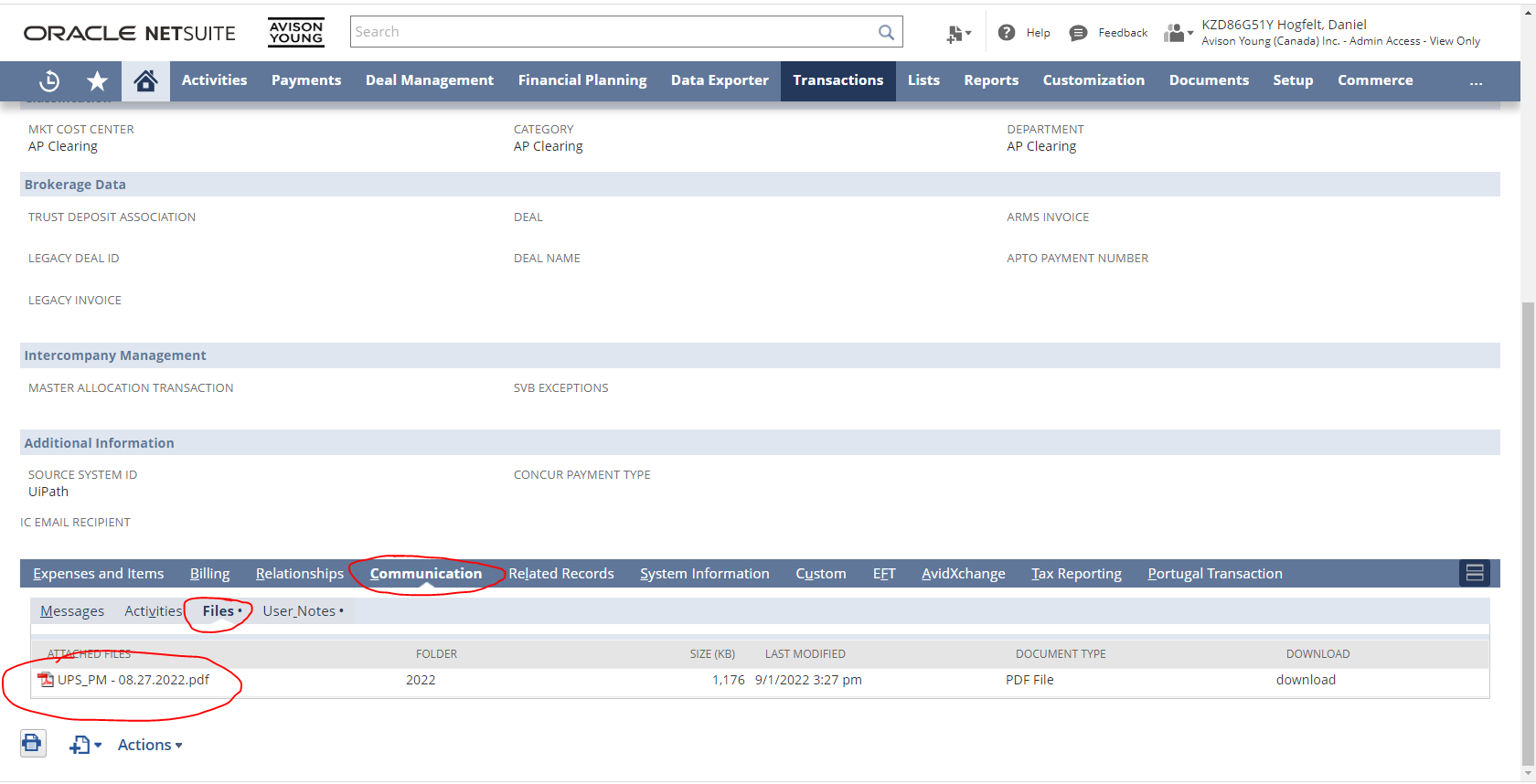
In order to open an invoice document from a Vendor Bill in NetSuite, first navigate to the bill in NetSuite. Then, click the "Communication" Tab, "Files", and the attached documents will then be displayed.
How to navigate to Coding Form from Invoice
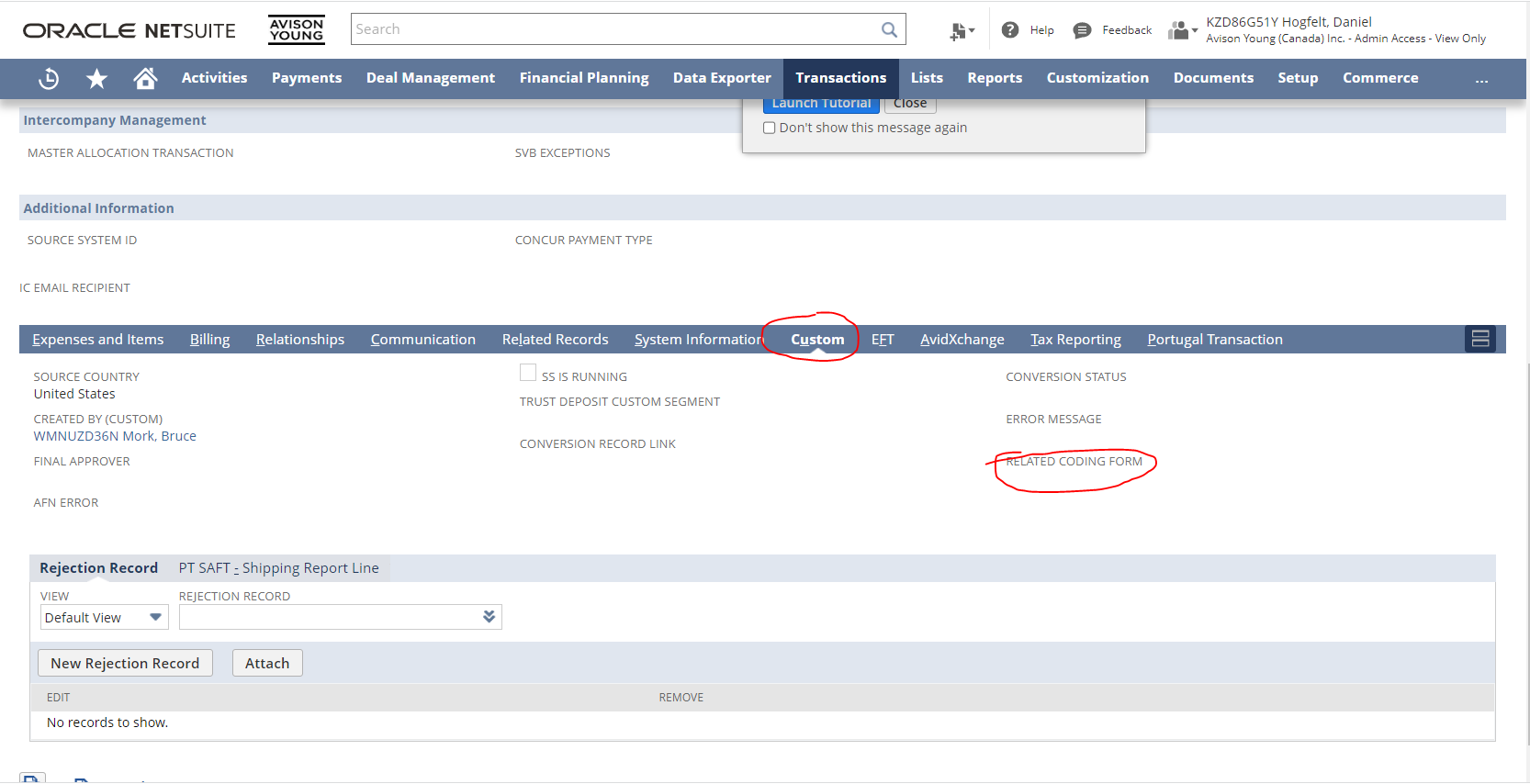
To navigate to the coding form from an invoice, go to the "Custom" tab, and the Coding Form link will be displayed under "Related Coding Form". Note, this field will only exist if UiPath created the invoice.
KPI's:
- When a new item received from NetSuite to “Invoice Processing” Queue.
- Trigger “Invoice Processing Dispatcher” starts the process “Invoice Processing Dispatcher”. Here the coding form submitted has new vendor flag “Ture” is checked. If True, a new item created in “Invoice Processing Dispatcher BRE”. If “False”, transaction item added to “Invoice Processing DU”.
- The Trigger “Invoice processing Dispatcher BRE” will start “Invoice Processing Dispatcher BRE”, which created “W9: Add new vendor task”. When successfully completed, item added for DU Processing.
- The trigger “Invoice Processing DU” start DU process and the data would be extracted form the invoice. If the confidence of extracted data’s is below threshold, validate task generated for process owner’s inputs. After successful validation, the new validated data are stored in AI center for future model training. And new queue item created for Performer bot.
- Trigger “Invoice Processing Performer” will start the performer process. This process would use the data extracted by DU bot, do vendor search, if unique vendor address found in NetSuite using “Remit To Address” from DU bot, process goes to create vendor bill after applying AP clearing logic, approvers validations.
- If vendor address not found, new item created in Invoice Processing Performer BRE to create Select vendor address task. After process owners’ input, data sent back to Performer bot for vendor bill creation.
- If amount from coding form <> invoice amount, new item created in Invoice Processing Performer BRE to for AP clerk to validate amount to reject invoice.
- If bot creates bills without attachment, “Review invoice” task item created in BRE for AP clerk to review and attach necessary files to shown bill id manually.
- Any system exception encountered throughout mail will be sent and Queue item for Manual vendor bill creation would be added.
If Bot Fails: Should Receive an email saying that bot failed. In this case, go to the production orchestrator and check the logs, Queues using Unique Identifier and process name mentioned in mail. Use these logs to perform a root cause analysis. A screenshot is not be provided at the time of the error, as this process doesn’t involve UI interaction.
Password Incorrect/Expiration: If the password is incorrect, password will need to be reset by following the below:
If SMTP Password is incorrect, contact Daniel Hogfelt.
If NetSuite Authentications parameters (All_NetSuiteCustomerKey, All_NetSuiteCustomerSecret, All_NetSuiteEndpoint, All_NetSuiteRealm, All_NetSuiteSignatureMethod, All_NetSuiteTokenId, All_NetSuiteTokenSecret) is incorrect, contact Daniel Hogfelt.
Known Error messages from UiPath that open tickets on support platform:
- Bot experienced error processing Invoice in DU Process.
- Depending on the error message accompanying this, a retry of the queue item should be done and if it fails again then a more thorough examination must be completed.
- Business Rule Exception (validation field left blank)
- This error message currently opens a ticket on Roboyo's support platform but we are working on not having it send this email. This is a business error and it will create a task for the user to create the bill manually. No support work needs to be done.
- Business Rule Exception (NetSuite record incorrect)
- This is a business rule exception and not something that the support team needs to take care of. This is an error within NetSuite that the finance team will handle on their end.
- String was not recognized as a valid DateTime.
- This error occurs as a result of a product gap from UiPath related to the format/structure of dates. When a date is extracted as text, UiPath will convert it to the numerical MM-DD-YYYY format. With certain structures/languages, this conversion has issues that are being investigated by UiPath.
- There is a temporary workaround to get these invoices to go through without manually submitting them. The support team can re-run the invoice to generate another validation task. In the validation task, replace the Invoice Date with the proper yyyy-MM-dd format.
- This error occurs as a result of a product gap from UiPath related to the format/structure of dates. When a date is extracted as text, UiPath will convert it to the numerical MM-DD-YYYY format. With certain structures/languages, this conversion has issues that are being investigated by UiPath.
Known Errors from NetSuite Response: if the below errors received from NetSuite during Bill creation API. Notify NetSuite/ Daniel. Disable triggers until it is resolved to avoid more incorrectly processed invoices.
- You do not have access to the media item you selected – indicates bot account (RPA Finance) has no access to file cabinet to attach provided file ids of invoice (W9 if available) in vendor bill creation payload. Hence, vendor bill would be created without any attachment. Bot will create “Review invoice” task.
- Coding Form Record is not found – refers to Unique identifier used in request payload is not available in NS system. Handled by “Manual vendor bill” creation task.
- error message provided by NS based on the type of the error – this includes bill creation failure due to Approvers id used doesn’t have role of approver, MCC/category/Department/subsidiary used is not valid. Handled by “Manual vendor bill” creation task.
Pipe is broken: When any of the API workflow invoked. The invoke python Method Activity throws “one or more error” which the python scope activity rephrases it “Pipe is Broken” Error. This could be due to following reasons:
- The arguments to make invoke API request are
- NetSuite authorization parameters passed empty/ null values
- Payload file contains special chars that breaks json structure and throw errors while compiling. So, removing those special characters will resolves this issue. Test the failed record and get the json file generated and check it json format doesn’t have any errors.
Known Errors in DU: if any errors during Digitalization/ extraction phase of invoice check the logs for error full stack. And reproduce the same in QA. Most of the time, these errors are thrown when invoice has high number of pages with small texts. Increasing timeout in ML extractor activity could solve these errors.
- Retry Scope - Extract: Request CorrelationId: <autogenerated id#>The delegate executed asynchronously through TimeoutPolicy did not complete within the timeout.
- Retry Scope - Extract: Request CorrelationId: <autogenerated id#> Invalid server response.
- Retry Scope - Extract: Request CorrelationId: <autogenerated id#> The underlying connection was closed: An unexpected error occurred on a send.
The above-mentioned errors were resolved by having new ML skill trained on version 22.2.4. (if in future this same error resurfaces reach out to uipath support team)
- Memory leak was caused by save image functionality. It starts to become more visible after periods of high load(more records put to process) - a big number of parallels requests in a period.
- Under high load, more than expected background tasks may be created which exceed the memory limits
- When this memory pressure happens, the process under load is restarted which put pressure on the remaining processes. This may lead to slowness and timeouts or even a downtime for a short period of time
• ML skill version 22.4.2 has functionality to handle high load and thus timeouts were resolved
Restarting Bot: If the bot needs to be restarted, some considerations need to be made. This bot works by adding items to a "queue" (one item for each Invoice). If the bot fails and needs to be restarted, it's best to clone the failed invoice queue items, as the bot will create a queue item for each stage of processing when the bot begins executing. To clone the queue items, go to "Queues" tab under "Invoice Processing" folder.
Note: Do not run jobs from processes tab, they need to leverage the queue trigger to function correctly. If you enable the triggers (queue) and they don't start right away, please wait some time as it can take up to 20 minutes to trigger.
Select "View Transactions" of “Invoice Processing”
Select the transactions that are Failed, clone them to re-run the failed item again.
Comments
0 comments
Please sign in to leave a comment.